
You can pin applications to the taskbar to find them more easily. Please follow these instructions to Pin or Unpin applications.
Pin Icons to the Taskbar
1. Type the name of your app in the search field on the taskbar. When the app appears, click on it to open it.
Once open, the icon will appear in your taskbar.
2. Right-clicking on the icon in the taskbar and on the new menu that appears, click on Pin to taskbar.
The icon for the app will now remain on the taskbar. To open the app, click on its icon on the Taskbar.
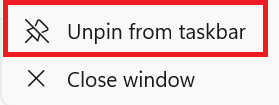
Unpin Applications from the Taskbar
1. Right-click on the application icon in the taskbar.
2. Click on Unpin from taskbar.
The icon for the app will no longer be located on the taskbar.